
Great Britain
All Desktop / Touch <32” - 01926 819189, All Large Format / Touch >32” - 01670 320 060
English
Monday to Friday: 9am to 5pm
By using this website you allow us to place cookies on your computer. They are harmless and never personally identify you. Accept

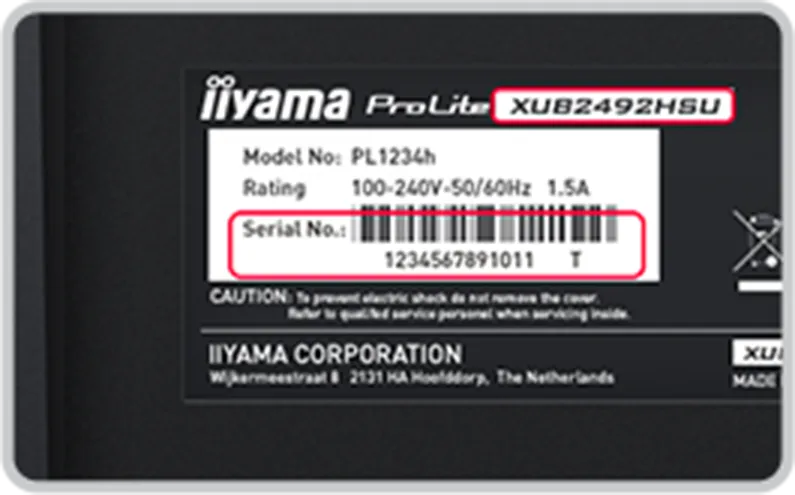

The standard European warranty period is three (3) years from the date of sale to the first end user as a new device. An end user is exclusively a person who acquires the product for their own use and not for the purposes of commercial resale. The warranty period for desk stands and mounting devices is five (5) years and for accessories, such as remote controls, it is one (1) year from date of purchase.
A warranty claim entitles the user to repair, replacement of defective parts or an exchange of the product for a product of equal quality without charging labour or material costs.
The performance of warranty claims shall cause neither an extension nor a restart of the warranty period.The cost and handling for the warranty process is covered by iiyama, unless a No Defect Found is detected. In this case iiyama reserves the right to raise any relevant charges to the customer.
For all iiyama products certified with TCO:
For all iiyama products certified with EPEAT2.0 or TCO:
In the event of a fault and or if you have any questions or problems, our customer service center will be happy to provide you with comprehensive answers.
Country
Phone Number
Languages Supported
Operating TIme
Great Britain
All Desktop / Touch <32” - 01926 819189, All Large Format / Touch >32” - 01670 320 060
English
Monday to Friday: 9am to 5pm
We have compiled the most frequently asked questions into a list, which we are continually expanding.
We also recommend using the search engine at the bottom of the page.
Enter model name or a single key word describing your problem.
Still need help? Feel free to contact support or try a new search above!
Product Recycling and Take-Back Scheme
iiyama is committed to supporting environmentally responsible disposal and recycling of electronic equipment. To help customers manage end-of-life products sustainably, iiyama offers a free-of-charge take-back and recycling service for eligible iiyama products.
This take-back and recycling scheme is available throughout the United Kingdom, Northern Ireland, the Channel Islands and the Isle of Man.
The scheme applies exclusively to products sold under the iiyama and iiyama G-MASTER brands. Products from other manufacturers or brands are not eligible for collection under this scheme.
Customers wishing to recycle eligible equipment can contact iiyama Customer Service to arrange collection. Collected products will be processed through approved recycling channels to support the recovery of materials and minimise environmental impact.
Conditions for Collection
To ensure collections can be completed safely and efficiently, customers must ensure that:
Where equipment is not available for collection on the agreed date, or collection cannot be completed because the above conditions have not been met, iiyama reserves the right to apply a charge for any failed collection and any subsequent re-collection visit.
Please note that products containing batteries should be disposed of responsibly and recycled in accordance with applicable local regulations. Batteries should not be disposed of with general household waste.
RoHS Compliance
iiyama products are designed in accordance with the requirements of the Restriction of Hazardous Substances (RoHS) legislation. These requirements restrict the use of certain hazardous substances, including lead, cadmium and chromium, in electrical and electronic equipment.
How to Make a Recycling Take-Back Claim
To request collection of eligible iiyama or iiyama G-MASTER products for recycling, please submit an Excel spreadsheet containing the following information for each item:
The completed spreadsheet should be emailed to [email protected].
Upon receipt of your request, iiyama will review the information provided and, where the products are eligible under the scheme, will arrange collection through either iiyama or an authorised recycling partner.
Please ensure that all equipment to be collected is covered by the scheme (iiyama and iiyama G-MASTER branded products only) and has been prepared in accordance with the collection conditions detailed above before submitting your request.
What Happens Next?
Once your recycling take-back request has been received and approved, iiyama or its nominated recycling partner will contact you to arrange collection at a mutually convenient date and time.
Prior to collection, you may be asked to confirm the quantity, model numbers and serial numbers of the equipment to be collected. All items must be disconnected from power and data connections, removed from any wall brackets, monitor arms, kiosks, floor stands or other fixed installations, and made available for collection in a reception area, goods-in area, loading bay or another agreed accessible location.
Following successful collection, you will receive confirmation detailing the equipment collected. Once the recycling process has been completed, a Certificate of Recycling or equivalent recycling documentation will be issued for your records.
Please note that if equipment is not available on the agreed collection date, or collection cannot be completed because the collection conditions have not been met, iiyama reserves the right to charge for any failed collection and any subsequent re-collection visit.
Customers remain responsible for ensuring that any confidential, personal or commercially sensitive data has been removed from equipment prior to collection.
EU energy labels, first introduced in 1994 are helping consumers identify products using less energy and therefore, over the products life span, costing less as well.
To simplify the scaling system, that up till now included multiple A levels (A, A+, A++, etc.), and to continue help consumers make informed choices when they buy new energy efficient products, the EU energy labelling framework regulation was updated and adopted three years ago (Regulation (EU) 2017/1369). The regulation reintroduces a simpler classification, using only the letters from A to G. The new scaling system came into force on February 28th 2021.
Please click on the download buttons below, to download Energy labels for all iiyama products in one click.
All iiyama LCDs are Plug&Play capable and are recognized by the operating system as a PnP device, no additional driver installation is necessary.
iiyama touchscreens are HID-compatible touch devices and are automatically recognized as such by the operating system.
Touch drivers for other operating systems can be found in the download area of the respective product.
Please refer to the manual of the respective product for the supported functions.You can also use the search function on the start page of the support area.
To download colour profile files for iiyama products, both new and old, please click on the download button below.
DOWNLOADNote: Please check the download tab available within a specific product to find drivers for your touch screen. You may also use the search tool available at the support section start page.
Some issues with your iiyama monitor can be solved remotely.
In case our support teams want to proceed with this option, you will need to have TeamViewer software available for your PC.
To download TeamViewer, please go to the official TeamViewer page and click here.
Spare parts for iiyama monitros are avaliable for 7 years after a particular model has reached end of life cycle.
For technical or other questions, please use our support form.
If you have questions about a specific product/spare part, please contact:
ENO telecom GmbH
Bentheimer Str. 118b
D-48529 Nordhorn
Contact form:
iiyama.eno.de/spare/parts
Request can be pricessed in English and German
iiyama Product Security Updates
iiyama is committed to providing secure products and services to our customers. This page outlines how we identify and address security vulnerabilities.
Identifying and Addressing Security Issues
We understand that even with careful development practices, security vulnerabilities can arise. Our team actively works to identify and address potential issues in our products.
Software Updates
iiyama is committed to providing timely security updates for our products. We provide software and security updates for a minimum period of at least 3 years after the product launch. We recommend that customers install all available software updates to ensure they have the latest security patches.
Collaboration for Improved Security
We value collaboration with partners, customers, and the security research community. We welcome reports of potential security vulnerabilities in our products. By working together, we can proactively address security concerns and enhance the overall security of iiyama products.
In order to reduce the risk of infection and to protect the users and customers of our monitors against a possible virus (e.g. COVID-19) transmission, we have compiled the following guideline to help you to sanitize our monitors in a proper way.
ATTENTION!
The below guidelines apply to all iiyama monitors and touchscreens EXCEPT FOR the optical touchscreens: T2252MTS-xxx , T2452MTS-xx, T2253MTS-xxx and T2453MTS-xx. For advise on cleaning iiyama optical touchscreen, please click here.
• Wash your hands using soap or an sanitiser with at least 60% of alcohol.
• If possible, wear a mouth mask to reduce the risk of possible transmission.
• Always wear disposable synthetic gloves while cleaning.
• If possible, turn off and unplug your device
• Use one of the following ECDC approved solution for environmental cleaning in non-healthcare facilities (e.g. rooms, public offices, transports, schools, etc.):
○ Isopropanol (a.k.a. isopropyl alcohol), 70% solution
○ Ethanol, 70% solution
• Use a clean non-abrasive cloth, for example in microfiber.
• Use the cleaning solution to dampen the cloth. Never spray the cleaning solution directly on the device.
• Wipe the screen gently and in small circles avoiding pressure.
• Make sure the glass and screen are completely dry before using the device again.
• Remove and discard the synthetic gloves after each cleaning and wash your hands in the same way as you have done it before the cleaning process.
• Avoid using the following products as they may cause discoloration on the monitor:
○ Ammonia
○ Acetone
○ chlorine-based products (e.g. bleach)
○ Peroxides (including hydrogen peroxide)
○ Paint thinners, benzene, methyl chloride, toluene


Your message have been succesfully sent.
Your message could not be sent. Please fill in all required fields and try again.
Keep up #withiiyama
You have successfully subscribed to our newsletter.